
diados
Extension of the Day

diados

5.0 FREE
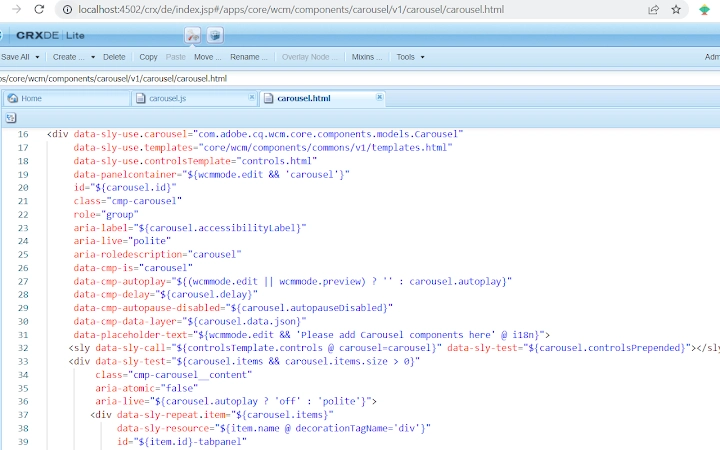
  • Screenshot 1

Description

The purpose of this extension is to allow AEM Developers to have better editing experience on AEM CRX Editor.CRX Power Editor provides below features:1. Smart Code Editor : This extension on the fly changes the CodeMirror IDE to better IDE such as Visual Studio Editor or Code Mirror 6.2. Colour Themes: Colour themes are supported to enjoy the personalized colour schemes such dark/light etc.This extension can be disabled or enabled for specific site.Please note that this extension can be enabled only on the /crx/de/index.jsp pages and cannot be used for any other purposes.Removed in 1.1.0 => Editor Hook(ms): This timer in milliseconds will check new crx tabs opened after specific time and convert them into the better editor.--------------------------------------Update 1.1.0----------------------------------* Removed EditorHook and used the Mutation Observer to avoid infinite loop of setInterval to observe files opened.* Fixed blank file issue when there is delay of opening large files or over slow network.* Fixed bugs in the Visual Studio editor for loading Markdown/Properties/Handlebar files.* Added bunch of exciting themes for Visual Studio Code and Code Mirror.

Guides & Tutorials for AEM CRX - Power Editor Extension for Chrome

How to install AEM CRX - Power Editor Extension for Chrome
  1. Click the Preview / Download button above.
  2. Once redirected, accept the terms and click Install.
  3. Wait for the AEM CRX - Power Editor Extension for Chrome download to finish on your device.
How to use AEM CRX - Power Editor Extension for Chrome

This software is primarily used for its core features described above. Open the app after installation to explore its capabilities.

User Reviews for AEM CRX - Power Editor Extension for Chrome 0

    No reviews found

Similar Apps


